
TUI
The TUI is OpenTUI (@opentui/core + @opentui/react). It attaches to the supervisor and never owns child processes.
cd examples/demo-platform
npx @amr-m-abdelgawad/devctl@latest
From a source checkout (bun on PATH):
cd examples/demo-platform
bun run ../../app/src/bin.ts
If a supervisor session already exists, the TUI attaches to it. Preferences: tui.json / DEVCTL_TUI_CONFIG — see Building from source.
First run
With no .devctl configuration the TUI opens setup: “No configuration found. Would you like to run setup? [Enter] Setup [Esc] Exit”. Enter starts the same 9-step wizard as devctl setup (OpenTUI fields, then write and attach the daemon — no process restart). Invalid existing YAML still refuses overwrite.
If a .devctl/config.yaml exists but fails to parse or validate, the TUI shows Configuration error with the actual error instead — pressing Enter here does not run setup, since that would silently overwrite the file the error is about. Fix the file and restart devctl, or run devctl config validate for the same error from the CLI.
If the configuration is valid but the supervisor never comes up (a listen port already in use, a crash during boot), the TUI shows Supervisor failed to start with the bootstrap-log line — not a YAML error. devctl daemon logs is the same file. A leftover process holding proxy.listen, telemetry.otlp, or web.listen is the usual cause; Doctor can name the holder. Do not kill the Cursor / IDE process if that is the holder — reload the window or stop that leftover session instead.
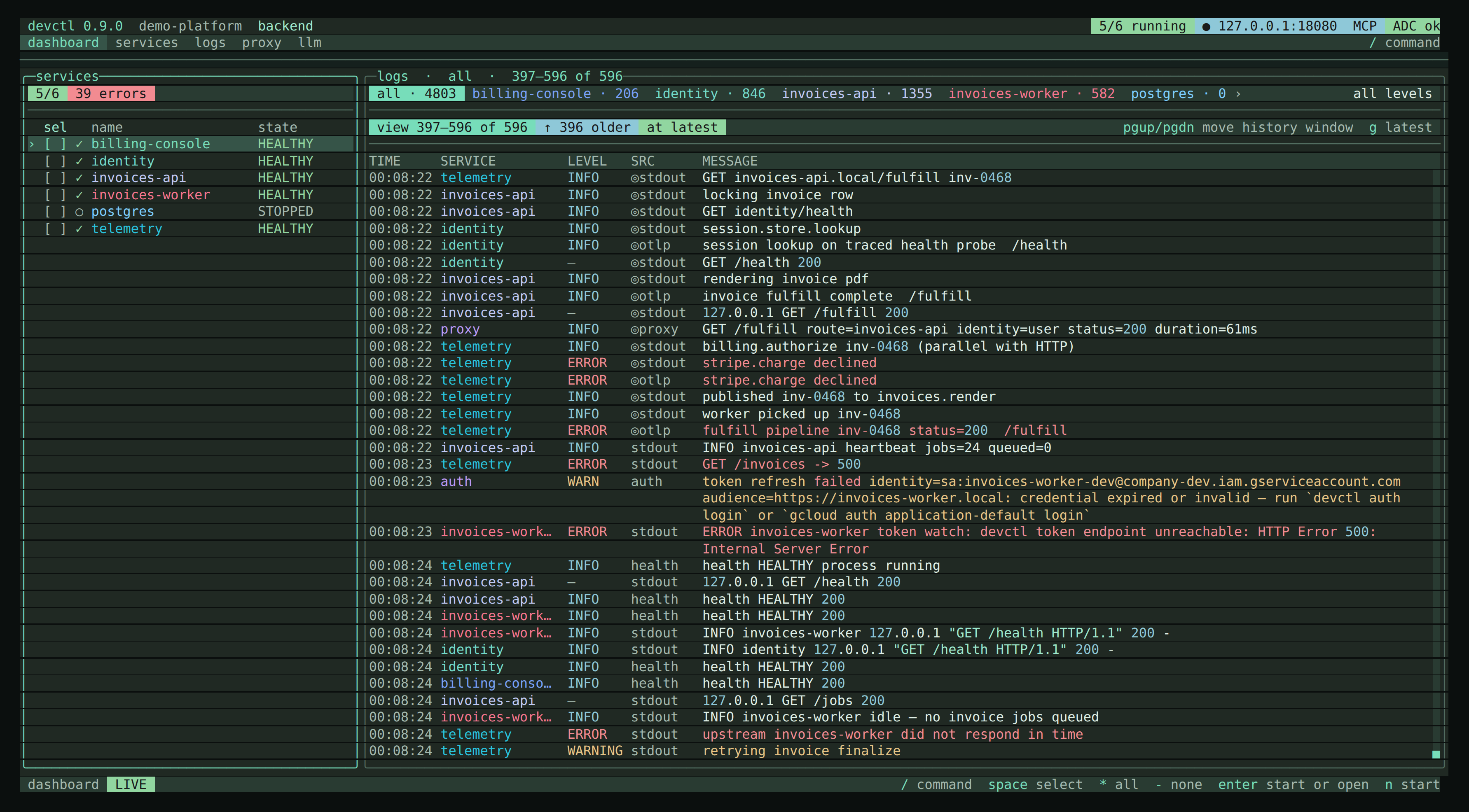
When services exist but none are running, the dashboard empty state:
enterstarts the default profile (first profile name alphabetically) after a plan overlayn/xstart or stop the highlighted row (or the space-selected set)- a lifecycle panel shows start and stop waves; later start waves wait for
service_healthydependents and do not run if a wave fails - the panel stays open until
escso you can read the result opicks a profile, then confirms start
Quit
q / /exit / esc twice:
shutdown.stop_services_on_exit | Behavior |
|---|---|
true | Stop managed services and leave |
false | Detach immediately |
| unset | Confirm: enter stops services, d detaches (daemon stays), k stops the daemon and leaves services (devctl down --keep-services), esc stays |
Detach (d) leaves the supervisor running. /down --keep-services (or quit k) stops the supervisor and persists PIDs so a later start can adopt them. /down stops services and the supervisor. /stop only stops selected services.
Interaction model
Keyboard-first. Chords use command on macOS and ctrl on Linux and Windows. Help, the status bar, and empty-state hints label the modifier for the OS you are on.
| Input | What it does |
|---|---|
/ | Command overlay — ranked as you type (name, alias, fuzzy, then description). /start api still lists start. ↑/↓ to move, enter to run |
command+p / ctrl+p | Same command overlay as / |
command+x / ctrl+x | Leader key (2s), then a shortcut — keymap overlay |
? | Grouped help — j/k scroll when the list is taller than the terminal |
tab / shift+tab / 1–5 | Cycle or jump the five nav tabs. Other screens are /auth, /credentials, /doctor, /config, /profiles, /setup, /stats, /topology, /tokens, /settings, /mcp. On a secondary screen, tab returns to the dashboard. When the strip is wider than the terminal it slides (‹ ›). |
s l a p d c u | Direct letter nav when no overlay owns keys (services, logs, identity, proxy, doctor, config, setup) |
r | Refresh snapshot (doctor r re-runs checks; LLM r toggles conversation / JSON tree; proxy r toggles pretty JSON / raw) |
R | Restart selected services |
j k / arrows | Move selection |
enter | Start (empty dashboard) or open service detail |
space | Multi-select a service |
esc | Back / close overlay. Twice (when nothing else is open) asks to quit |
f | Logs and proxy. Focus search. On logs, esc closes search and returns to the live stream; enter keeps the filter (esc again clears it). On the proxy screen the query is a traffic substring (!Poll excludes; !! matches a literal !). esc clears it. Remap with keybinds.search |
z | Expand logs to fill the terminal. z or esc exits |
w | Cycle log wrap: wrap every line (default), clip with ellipsis, or unwrap only the selected row |
command+c / ctrl+c | Copy the highlighted selection (drag with the mouse). Remap with keybinds.copy |
command+= / ctrl+= (and - / 0) | Display size (padding/row height, not the terminal font) |
esc esc | Twice to quit when no overlay or back target is open. The OS copy chord does not quit |
| Mouse | Click nav, click a service, scroll logs (toggle in Settings) |
The status bar only lists keys that work on the current screen. There is no idle command row — / and the OS palette chord open the command overlay.
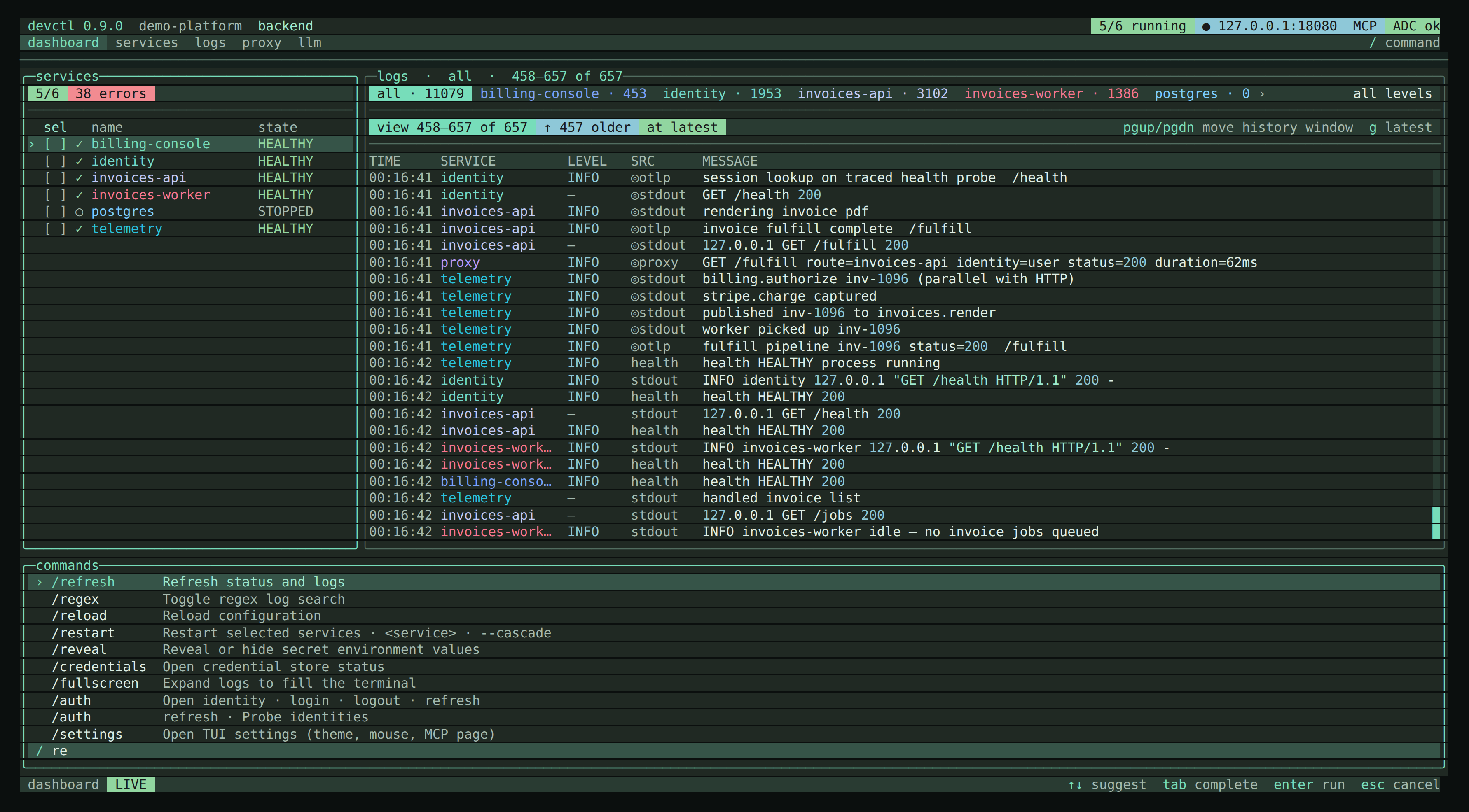
Nav tabs (5)
- dashboard · 2. services · 3. logs · 4. proxy · 5. llm
Everything else is a slash command (or a letter jump): /auth, /credentials, /doctor, /config, /profiles, /setup, /stats, /topology, /tokens, /settings. MCP is /mcp, /agent, or Settings → MCP → Settings page.
Screens
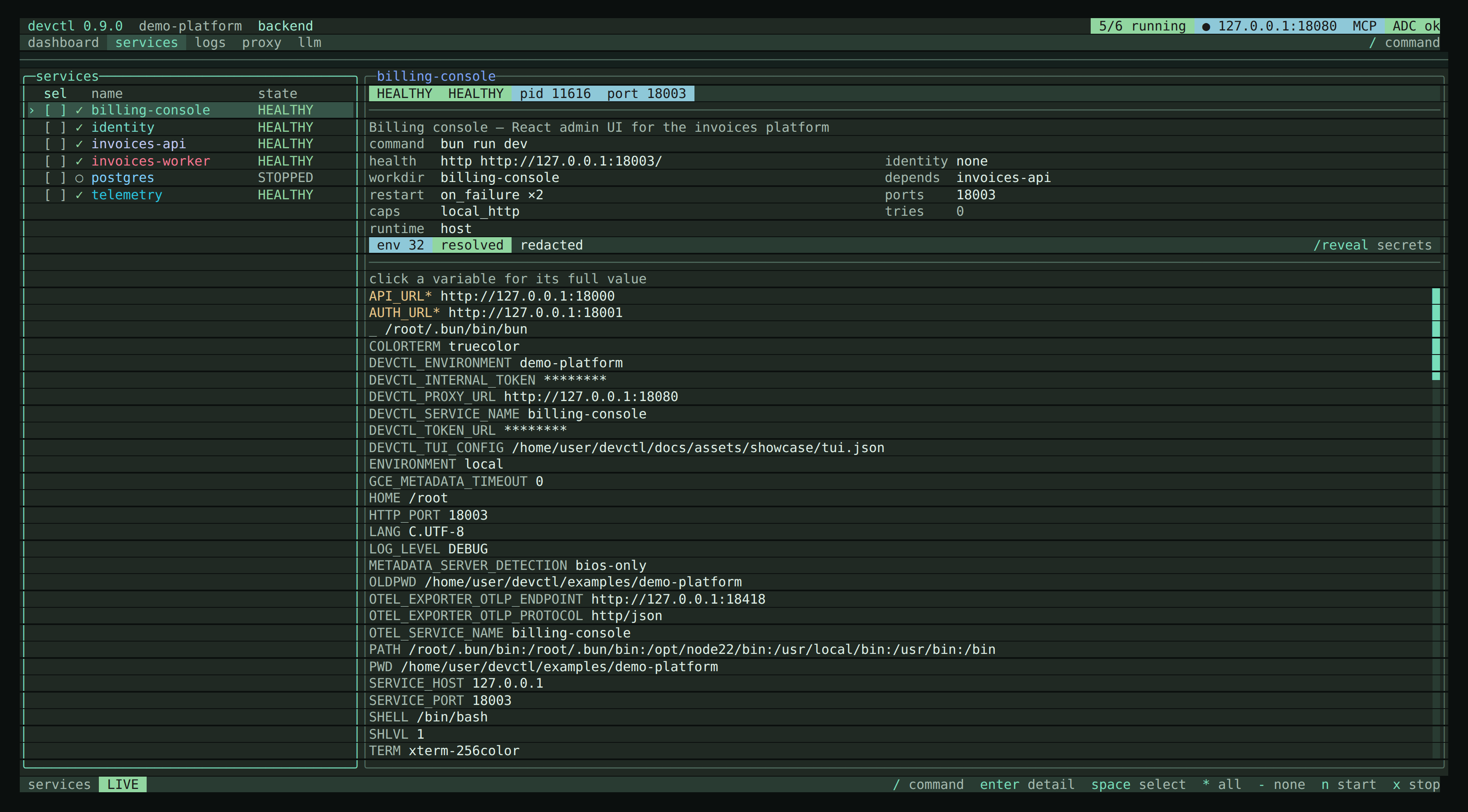
- Dashboard — services, proxy, live log tail. Identity lives on
/auth; ADC status is in the header. When nothing is running, a last session panel shows leftover PIDs from the previous supervisor (same datadevctl statusprints when the socket is down) - Services — list plus a live inspector: status chips, two-column facts, then a scrollable resolved env table (key column + clipped value; dotenv, profile, secrets, plugins, runtime ports). Click a row for the full value. Narrow terminals stack the panes.
enteropens the full detail screen - Service detail — same inspector; env pane is focused so
j/kscroll./revealshows secrets.n/x/R/l - Logs — ANSI color codes are stripped so wrap uses visible width; messages wrap to the pane with OpenTUI word wrap. The all chip keeps the total across services; picking one service does not rewrite that count.
wcycles wrap all / clip / wrap selected.\\//splitopens a second pane on the same live stream (independent service filter, shared search)./trace <id>or Enter on a log details request id jumps search to that id. See Logs - Identity — user, project, source, ADC, gcloud, configured SAs, impersonation AVAILABLE/UNAVAILABLE, IAP (no tokens).
/auth loginsuspends the TUI, runsgcloud auth application-default loginon the real terminal, then restores the TUI./auth logoutrevokes ADC without leaving the screen - Credentials — store backend and entry names only. Tokens stay in the OS keychain or
~/.devctl/credentials - Proxy — status + routes (inspect chip when
inspect.enabled); list of captured hops plus a live inspector (syntax-colored pretty JSON / raw). Request and response bodies wrap to the pane and scroll vertically.rtoggles body mode.fsearches hops (!Pollexcludes a substring,escclears)./caller <service>filters hops by originating service (-for none, empty clears) so a noisy neighbor does not bury the service you are debugging. Click a hop orenteropens the overlay with a collapsible JSON tree (enteragain jumps to a trace when one is present). Click▸/▾to expand or collapse a node. The highlighted hop stays selected when newer hops arrive, without scrolling the list back to it;j/kmoves and keeps the cursor on screen. Empty state explainsinspect.enabledand that unproxied127.0.0.1sockets are invisible.nstart /xstop. Ifproxy.listen.portis missing, the screen says so andnreports the bind error in the status bar instead of crashing. See Proxy - LLM — list of recent calls (time, status, caller, model, latency, tokens) with a live inspector for the selected row: status chips, caller / via, and a conversation transcript when the body is chat-shaped (otherwise syntax-colored JSON).
r(or the conversation/json chip) switches the inspector and overlay between the transcript and the request/response JSON tree. Click selects; click again orenteropens the full overlay (payload, attributes;enteragain jumps to a trace when one is present). Click▸/▾to expand or collapse a node. The highlighted call stays selected when newer calls arrive, without scrolling the list back to it./callerfilters. Usage counts are not secrets./revealdoes not unmask LLM payloads — those are redacted at ingest. See LLM inspector - Doctor — re-runs on every visit; ✓ / ! / ✗ with hints.
enteron a busy host port asks to stop that process; it never offers to kill the Docker or Podman daemon.rreruns - Config — merged view including tasks.
v//bufferopens a validate/save overlay oncfg.configPath(invalid YAML is not written;escdiscards).e//editstill opens$EDITOR/DEVCTL_EDITOR./diffshows provenance (devctl config diff)./reloadre-reads after an external edit - Profiles — members;
enterselects and offers start - Setup — onboarding checklist. First-run with no config still opens here
- Settings — grouped prefs: save scope (this repository overlay vs all checkouts), theme, display size, web console appearance, mouse, leader, scroll speed, log timestamps/metadata, MCP page, Regenerate tokens (
regenerate_session_tokens, off by default; on remints saved MCP and web bearers after 7 days), web console on/off and port, inspect body cap (writes.devctl/config.local.yaml), about, scoped reset.←/→writes the highlighted cycle or toggles, except web port which previews until Enter. Reset asks first and leaves MCP listen and token regeneration as they are. Default writes~/.devctl/state/<repoID>/tui.json; switch Save to for~/.devctl/tui.json. MCP listen always stays per checkout.DEVCTL_TUI_CONFIGkeeps changes session-only; layer badges then showoverrideordefault, not an ignored overlay. - MCP — Listen
[ ON ]/[ OFF ], port stepper‹ N ›, per-agent Copy JSON / Copy TOML, and a Tools list grouped by purpose (inspect, logs, diagnostics, control, setup) with each tool markedreadorwrite;spaceenables or disables the highlighted one, all on by default. Off by default. See MCP
/reveal toggles secret env values for this session only. The header shows secrets shown. It does not restore log lines, LLM request/response bodies, or traffic inspector payloads; those are redacted when stored.
Slash commands
/ and command+p / ctrl+p open the same overlay. Each row already shows a one-line description in the TUI; this table is that catalog for reading without the TUI (and for MCP search_docs). Grouping matches the overlay.
Services
| Command | Aliases | What it does |
|---|---|---|
/start [service…] | /up | Start selected services or the current profile |
/stop [service…] | Stop selected services | |
/restart [service…] | Restart selected services | |
/restart --cascade | -c | Restart selected services and their dependents |
/run [task] | /task | Run a one-off task; empty /run opens a picker |
/exec [service] | Run a command in a service context; empty /exec opens a picker | |
/env [service] | Switch a service's named environment overlay |
/start with no names starts the current profile. /restart without --cascade restarts only the named services; R when dependents exist asks: Enter = named, c = cascade. Task output lands in Logs under task:<name>. /exec <service> -- <command…> runs once in that service's resolved environment (even if it is stopped). Empty /exec opens a service picker, then you type the command. /exec <service> --print-env [--reveal] shows the same resolved map (dotenv, profile, secrets, plugins, ports), not config-only vars/defaults. /env (or e on the dashboard, services, or detail screens) opens a per-service overlay picker when that service defines environments. /env <service> <name> selects immediately. Switching a running process whose overlay would change asks first: Enter switches for the next start, r switches and restarts now. The inspector chip shows env deployed · restart until the process is restarted; the service list env column uses warning color for the same pending state. Other services keep their own selection.
Navigation
| Command | Aliases | What it does |
|---|---|---|
/services | /s | Open the services screen |
/logs | /l | Open the log viewer |
/auth | /identity, /a | Open identity |
/auth login | Run gcloud ADC login | |
/auth logout | Revoke application-default credentials | |
/auth refresh | Probe identities | |
/credentials | /creds | Open credential store status |
/proxy | /p | Open the proxy screen |
/llm | Open the LLM inspector | |
/caller <service> | Filter LLM or proxy traffic by originating service (- for none, empty clears) | |
/mcp | /agent | Open the MCP server screen for coding agents |
/doctor | /d | Run environment diagnostics |
/stats | /metrics | View system and service statistics |
/topology | /graph | View the service dependency graph |
/tokens | /token-log, /authlog | View the token mint and refresh timeline |
/config | /c | View merged configuration |
/profiles | /o | Select a development profile |
/setup | /init | Open setup guidance |
/dashboard | /home | Return to the dashboard |
/stats includes sparklines when the supervisor has samples — a Trends section with per-service CPU and RAM history, and a Proxy routes section with per-route hop latency (p50/p95/p99) and error counts over the recent-request window. /topology (or g) draws the dependency graph as startup waves — nodes coloured by health, with an inspector showing what a selected service depends on and what depends on it. /tokens is the auth timeline: token mint, refresh, and identity-change events over the session, keyed by identity and audience (never by request, and never showing the token itself).
Logs
| Command | Aliases | What it does |
|---|---|---|
/regex | Toggle regex log search | |
/since <timestamp> | Filter logs after an ISO timestamp | |
/until <timestamp> | Filter logs before an ISO timestamp | |
/history [session] | Load a persisted log session | |
/pause | Pause or resume live logs | |
/fullscreen | /zen, /expand | Expand logs to fill the terminal |
/split | Split the logs screen into two service panes | |
/trace <id> | Search logs for a request or trace id | |
/filter | Toggle ERROR+ log filter | |
/levels [levels] | /level | Show only these log levels, such as info,warn or warn,error |
/health | /health-logs | Show or hide health-check logs, including REST and gRPC health request lines |
/system | /internal | Show or hide internal auth/mcp/devctl/proxy logs |
/grpc | Show or hide gRPC proxy logs | |
/wrap | Cycle log wrap: all lines, clip, or selected row | |
/export [path] | Write filtered logs to ~/.devctl/exports | |
/exports | /open-exports | Open the log export folder |
/clear | /new | Clear the on-screen log buffer |
/levels info,warn — Info and warn. /levels warn,error — Warn and error. /levels error,fatal — Error and fatal. /levels all — Show every level, including lines that have none. /health hides supervisor probes and request logs for HTTP health, ready, and live endpoints and gRPC grpc.health.v1.Health, from the service and the proxy. /split is also \\; | focuses the other pane. /trace sets log search to a request_id / trace_id. /grpc (or b on Logs and the dashboard) shows or hides gRPC proxy logs; HTTP proxy lines stay. /export without a path writes under ~/.devctl/exports. /clear only clears this TUI's on-screen view, not the daemon's shared log buffer.
UI
| Command | Aliases | What it does |
|---|---|---|
/reload | Reload configuration | |
/import | Preview or write a Compose mapping | |
/import compose [path] [--write] | Preview a Compose mapping; add --write to save | |
/diff | /provenance | Show winning config sources and what they shadowed |
/themes [name] | /theme | List available themes |
/settings | /prefs, /preferences | Open TUI settings (scope, theme, listeners, reset) |
/help | /? | Show the help dialog |
/refresh | Refresh status and logs | |
/edit | Open configuration in $EDITOR | |
/buffer | Edit configuration in a validate/save buffer | |
/reveal | Reveal or hide secret environment values (not log, LLM, or traffic payloads) | |
/copy | Copy the highlighted selection to the clipboard |
/reload re-reads .devctl. /diff is the same provenance view as devctl config diff. /themes opens a picker with live preview; Enter saves to the current settings scope (this repo overlay or user tui.json).
App
| Command | Aliases | What it does |
|---|---|---|
/daemon | /bootstrap | Show supervisor bootstrap logs (same file as devctl daemon logs) |
/update | Install a newer GitHub Release when the install method is known | |
/notify | /notice, /notifications | Hide or dismiss the current notice |
/notify later | Hide this notice until the next session | |
/notify dismiss | Do not remind me about this version again | |
/version | /v | Show the current devctl version |
/down | Stop the supervisor | |
/down --keep-services | Stop the supervisor and leave processes running | |
/exit | /quit, /q | Exit (detach or stop services) |
/down is not an alias of /stop. /down stops services and the supervisor unless --keep-services is set. /version shows the current version, then runs the same update check as /update without installing. /update installs when the method is known (npm or Homebrew).
Leader key
Default leader is command+x on macOS and ctrl+x elsewhere (2 second timeout). Then:
n start    x stop    R restart (c cascade if dependents)    s services    l logs
a auth     p proxy   d doctor     c config      o profiles     g topology
t themes   e env     r refresh    i setup       h dashboard
q quit     z fullscreen
Override in tui.json (keybinds) or DEVCTL_TUI_CONFIG.
Layout
- Header — product + version as text, then project and profile; chips for running count, live proxy, MCP when on, ADC, secrets-shown, and
↑ <latest>when a newer GitHub Release exists - Notice bar — a one-line, non-modal banner when an update is available (
Update/Later/Dismiss)./notify laterhides it until the next session;/notify dismisswritesdismissed_notificationstotui.jsonso that version does not return - Nav — the five primary tabs; the active tab is highlighted, not filled
- Body — dashboard or a focused screen
- Command overlay —
/andcommand+p/ctrl+popen the same grouped list with a real OpenTUI input - Status bar — live/paused, last human result, contextual keys
Status is never color-only: ✓ healthy, ● running, ! warning, ✗ failed, ○ stopped.
Themes
/themes opens a picker with live preview. Built-ins:
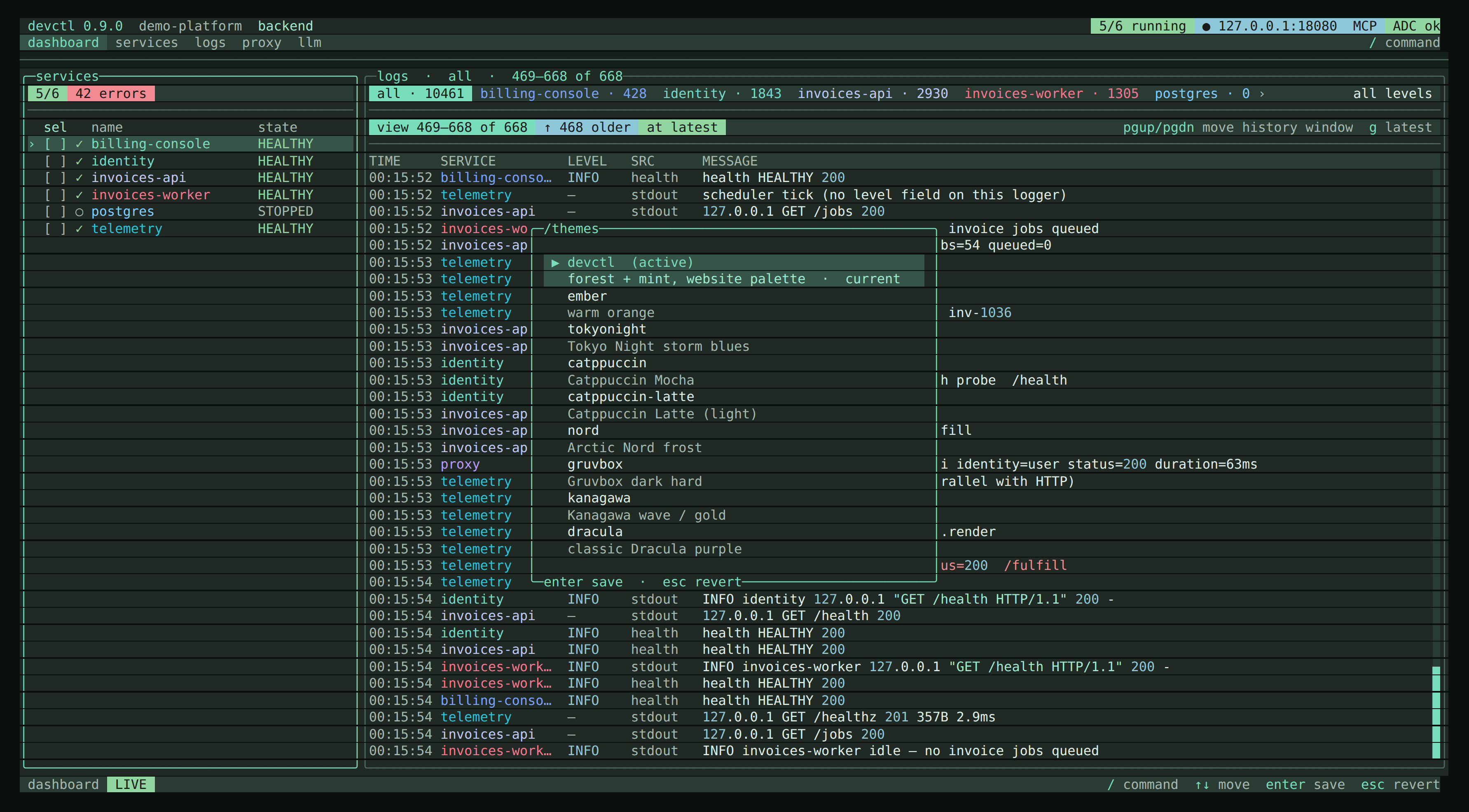
- Product:
devctl(default),ember - Common dark:
tokyonight,catppuccin,nord,gruvbox,kanagawa,dracula,onedark,monokai,rose-pine,everforest,github-dark,iceberg,ayu-dark,oxocarbon,night-owl - Light:
catppuccin-latte,solarized-light - Other:
solarized-dark,terminal(black + VGA ANSI chrome; aliasesansi,xterm,console),system(follows macOSAppleInterfaceStyle/COLORFGBG; light uses Solarized Light)
Aliases: mocha → Catppuccin Mocha, latte, one-dark, solarized (dark), rosepine, github, ayu, night owl.
MCP agent chips use brand colors (Claude terracotta, Cursor blue, Kilo gold, Codex green) with light/dark variants.