
FOR YOUR CONTAINERS
Define multi-container applications, networks, and volumes.
WITH DEVCTL
Bring host processes and configured containers into one local session, with profiles and health checks.
Compose files aren’t imported automatically.THE LOCAL DEVELOPMENT ORCHESTRATOR
Your services, logs, and local stack. One terminal to start, inspect, and keep everything moving.
npm install --global @amr-m-abdelgawad/devctlNode.js 18+ · macOS, Linux & Windows Requirements ↗
No account. Your machine. Try the demo
Try starting invoices-worker, then explore its logs.
Click a service to start or stop it. Watch the running count and combined logs respond.
WORK YOUR WAY
Stay hands-on, script the routine,
or let your agent take the next step.
Start services, follow logs, and check health in a keyboard-first terminal interface.
Explore the TUI Command lineBring the same controls to scripts and CI. Run tasks, inspect config, and keep moving.
Meet the CLI AI agentsConnect your agent over MCP to inspect and operate the same local session. Enabled when you choose.
Connect with MCPFROM STARTUP TO SOLVED
A typical debugging workflow
using the included demo platform.
STEP 01 / 04
In the demo platform, the backend profile groups identity, the API, its worker, and telemetry. Start them together, then attach to the same session.
devctl start --profile backendNext: devctl attach
Read the guideFIND YOUR FOCUS
Group services into named profiles.
Start the part of your stack you need.
DEMO PLATFORM / EXAMPLE PROFILE
devctl start --profile minimal
Start with the essentials: identity, the invoices API, and telemetry.
Your repo, your names. Profiles are defined in your config.
FROM REPO TO RUNNING
Start with Node.js. The npm package includes its own Bun runtime. Google Cloud is optional.
Installation guidenpm install --global @amr-m-abdelgawad/devctlThen, from the repo you want to run:
devctl setupDescribe your services in a single config.
devctl doctorSee what’s missing before you start.
devctlOpen your dashboard. Press enter to start a profile.
YOUR REPO, DESCRIBED
A minimal example adapted from the demo.
Run it from examples/demo-platform with Python 3.
version: 1
project:
  name: demo-platform
services:
  identity:
    command: [python3, main.py]
    working_dir: identity
    ports:
      http: 18001
    health:
      type: http
      url: http://127.0.0.1:18001/health
profiles:
  minimal:
services: [identity]Run the existing Python service in its own directory. No application rewrite.
Give the HTTP port a name and check the service’s /health endpoint.
The minimal profile here contains just identity. Add services as your repo grows.
devctl start --profile minimalWHERE IT FITS
Your existing tools keep their place. devctl brings the running session together.
FOR YOUR CONTAINERS
Define multi-container applications, networks, and volumes.
WITH DEVCTL
Bring host processes and configured containers into one local session, with profiles and health checks.
Compose files aren’t imported automatically.FOR THE REPEATABLE
Build, format, and generate code with commands you already trust.
WITH DEVCTL
Keep those commands. Give long-running services and named tasks a shared place to run.
FOR DIRECT CONTROL
Open a shell, run a command, and work directly with a process.
WITH DEVCTL
See service state and logs together. Your CLI, TUI, and optional agent connection share one supervisor.
THOUGHTFUL BY DEFAULT
One supervisor keeps processes, containers, the proxy, and logs in sync across every control surface.
See how it fits togetherDefine services, profiles, health gates, and hooks in YAML.
An auth-aware proxy injects Google / IAP tokens. Tokens stay out of logs.
Doctor reports missing tools and setup issues. It never auto-enables anything.
A DIFFERENT PERSPECTIVE
Follow services, requests, and traces in an optional local console. The same supervisor, with a wider view.
Explore the web console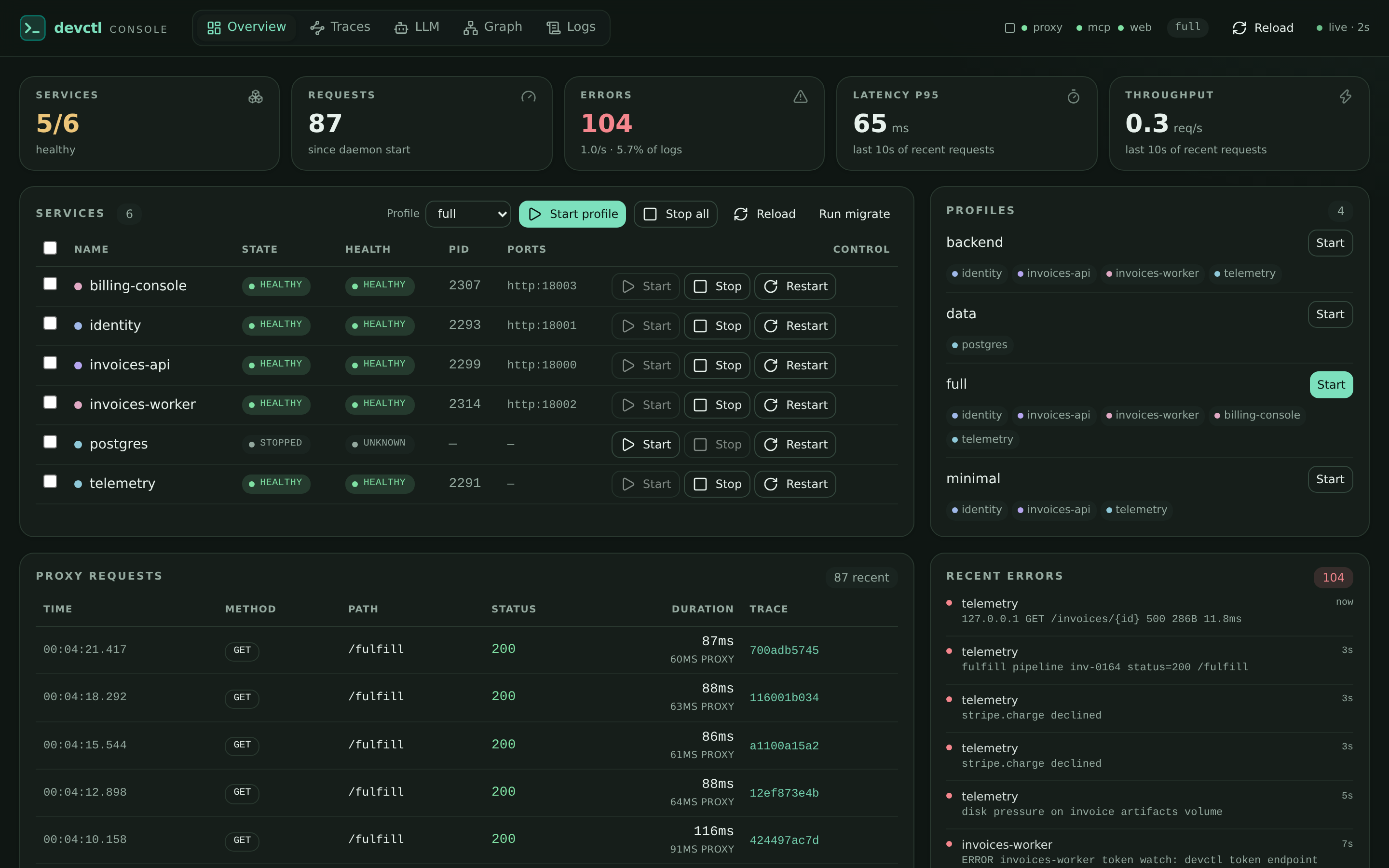
Your session, expanded. Services, traces, and logs together.
Local by default. Start it when you need it with devctl web start; the token rides in the URL fragment.
FOLLOW THE CONNECTIONS
Open /topology to inspect startup waves, health, and dependencies. Select a service to see its connections.
Inspect spans and correlated logs when your services emit trace data. Connect proxy requests to the evidence behind them.
Explore tracing“Why is invoices-api failing?” Enable MCP and connect your agent to inspect get_status, recent_errors, and get_logs. You control which tools are available.
TAKE A LOOK AROUND
A console, an API, identity, and a worker. Explore the included demo platform before configuring your own repo.
A FEW GOOD QUESTIONS
A little context for your first session.
Neither is required for local host processes. Use Docker or Podman when your configuration includes containers. Google Cloud tools are optional and only needed for the Google authentication features you choose to use. See installation requirements
Describe how your services run in .devctl/config.yaml: their commands, working directories, environment, and health checks. devctl works with that configuration. Explore configuration
Yes. The TUI, CLI, and MCP connect to the same per-repo supervisor. Start a profile from the CLI and attach to its session with devctl attach. See how sessions work
No. MCP is off by default. When enabled, it listens on the local loopback interface. You choose when to connect your agent and can disable individual tools. Read the MCP guide
Yes. Run npx @amr-m-abdelgawad/devctl@latest from your repo. Node.js is required; the npm package includes its own Bun runtime. Follow the quick start
LESS FRICTION. MORE FORWARD.
Free and open source · MIT licensed · Use at your own risk