
Environment
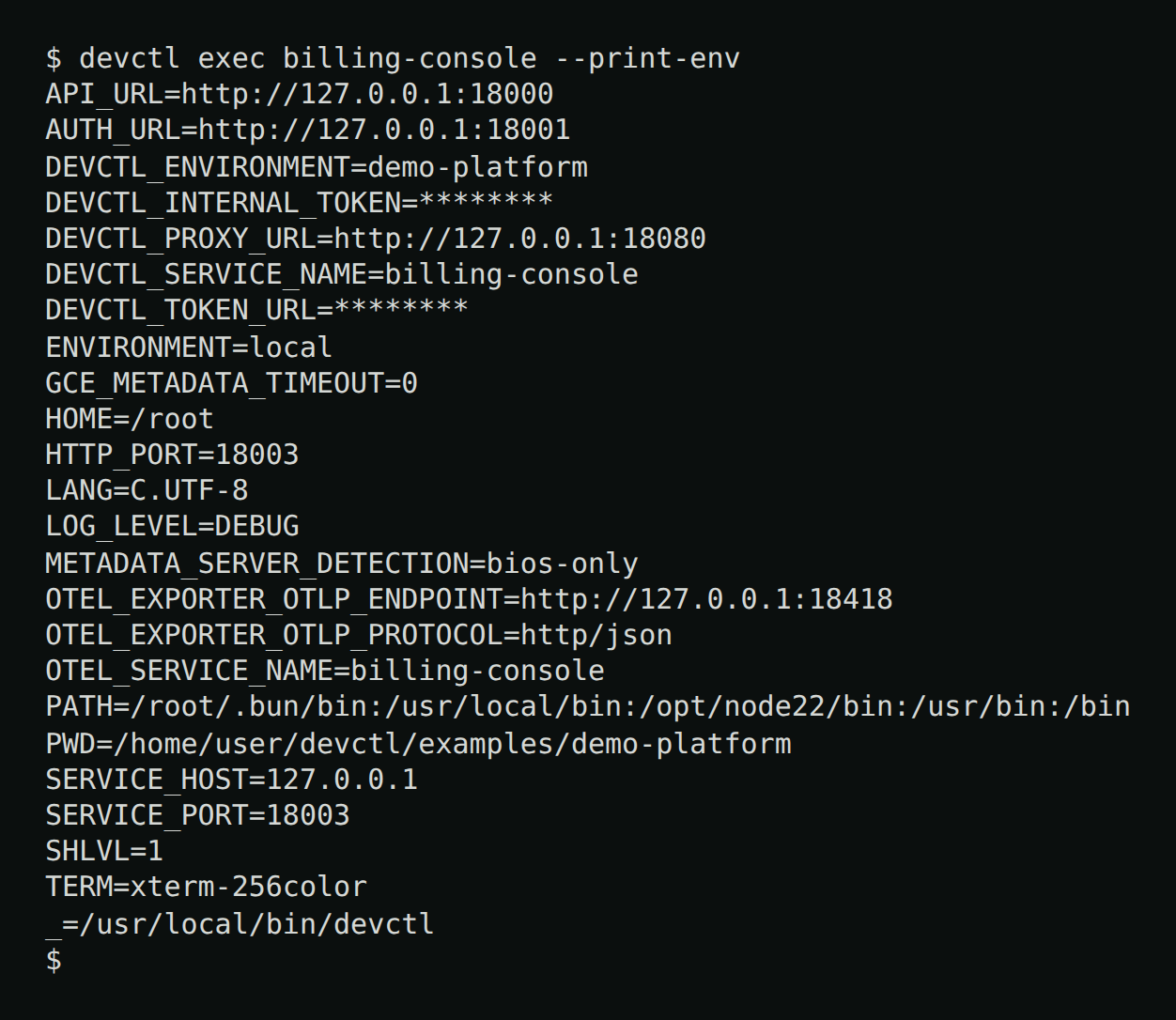
Each service process gets a merged environment. Later sources override earlier ones. devctl exec <service> --print-env prints exactly what a service resolves to, with secret-like values redacted (--reveal to show them):
Default source order (ENV_SOURCE_ORDER / environment.sources):
process, secrets_env, defaults, terraform, helm, vars, profile_service, and runtime always run for host services. Container services deliberately omit process so the caller's whole shell is not stored in inspectable container metadata. If you set environment.sources, the listed optional sources (profile, dotenv, generated, keychain, sops, secret_manager) are added to the always-on set. Listing secret_manager also enables dotenv, so .env can fill keys when Secret Manager is unreachable. terraform and helm are always in the order and are configured per service (environment.terraform, environment.helm), not in environment.sources. Each contributes nothing until that field is set.
| Source | What it loads |
|---|---|
process | The env of whichever CLI/TUI client most recently started or restarted this service (forwarded over the RPC as client_env), falling back to the supervisor's own environment if no client has done so yet — see below |
profile | profiles.<name>.environment (fleet-wide; loses to service vars) |
dotenv | Repo-root then service working-dir: .env, .env.development, .env.local, .env.<profile> |
secrets_env | Always-on dotenv file: gitignored .devctl/secrets.env, then weaker ~/.devctl/secrets.env. Wins over repo .env; process and profile keys still win. No schema key — it is not listed in environment.sources |
generated | Built-in hook that always returns {}. A plugin may register environmentSources if you need generated values |
keychain | Named secrets from environment.secrets / the credential store |
sops | sops --decrypt --output-type json on environment.sops.file at daemon start and devctl reload. The sops binary must be on PATH. A missing binary, missing file, or failed decrypt (KMS, age, PGP, network) skips the source with a warning; services that environment.required a key SOPS was supposed to provide then fail to start. Plaintext is kept in memory only |
secret_manager | Values that look like projects/*/secrets/* via the Google REST API. Missing ADC, HTTP 401/403, or a network failure skips that key so dotenv / secrets.env / process env remain. A malformed resource name or HTTP 404 still fails |
defaults | services.<name>.environment.defaults (and the selected environments.<env>.defaults) |
terraform | Literal env values from services.<name>.environment.terraform (a .tf file, a .tfvars file, or a directory). terraform.tfvars and *.auto.tfvars in that directory are read. Always in the order; empty until that field is set. See below |
helm | Literal env values from services.<name>.environment.helm (a Helm chart or Kubernetes YAML). Always in the order; empty until that field is set. See below |
vars | Explicit services.<name>.environment keys (and the selected environments.<env> keys, which win) |
profile_service | profiles.<name>.service_environment.<svc> — per-service keys that win over vars |
runtime | Values devctl injects at start |
keychain throws only when that source is listed and the file exists but cannot be read. secret_manager throws on a malformed environment.secrets resource name or when Google returns a non-access error (for example HTTP 404). Missing credentials, HTTP 401/403, and transport failures skip the key instead of aborting start — list dotenv (or rely on the default full order, or always-on .devctl/secrets.env) so local files can fill those values. sops never aborts daemon start: it logs a warning and contributes nothing, so a later source or environment.required can still decide the outcome.
SOPS
Experimental.
environment.sopsmay change without a deprecation period. See Experimental features.
environment:
  sources: [sops, secret_manager]
  sops:
    file: secrets.enc.json   # relative to the repo root
    # Optional. json, yaml, or dotenv. Omit to detect from the file name
    # (secrets.enc.json, secrets.enc.yaml, secrets.json.enc, .env, …).
    input_type: json
    # Optional. Env var name → SOPS key. Several env vars may share one key.
    # Mapped SOPS keys are not also injected under the raw name.
    # Keys absent from key_map are uppercased. Nested objects use a dot path
    # (`db.password` → `DB_PASSWORD`). Arrays are JSON strings.
    # `#`, spaces, and newlines in values are kept.
    key_map:
      MY_API_KEY: my_api_key_secret_name
      MY_DB_PASSWORD: db_password_secret_name
      SERVICE_A_TOKEN: shared_token
      SERVICE_B_TOKEN: shared_token
sops wins over dotenv and .devctl/secrets.env. secret_manager still wins over sops when the fetch succeeds, so a repo can move keys to Secret Manager without dropping the file. devctl runs sops --decrypt --output-type json <file> once at daemon start and again on reload. A dotenv or YAML SOPS file is still read as that format (--input-type); only the decrypt result is JSON, so nested values, #, spaces, and newlines survive. It does not write the plaintext to disk. The next start or restart picks up a reload; a running process keeps the environment it was launched with until then. If the decrypted values changed and a service is still running, reload reports that service in restart_required.
environment.sops.file is required when sops is listed, and the path must stay inside the repository (including after symlink resolution). devctl config validate rejects a missing file field, an unknown input_type, an empty key_map value, or a path that escapes the repo. A missing file or a decrypt error is a runtime warning, not a validate failure.
Terraform
Experimental.
environment.terraformmay change without a deprecation period. See Experimental features.
Point a service at the Terraform that already defines its deployed environment. devctl reads those literal values when the service starts, so the same keys do not have to be copied into YAML.
services:
  api:
    environment:
      terraform:
        path: deploy/api          # a .tf file, a .tfvars file, or a directory of *.tf
        resource: google_cloud_run_v2_service.api   # optional
        # attribute: service_env   # optional extra map name
      # Local-only keys stay here and override Terraform.
      AUTH_URL: http://127.0.0.1:${services.identity.ports.http}
A string is shorthand for the path: terraform: deploy/api/main.tf. A path of deploy/api/main.tf also reads terraform.tfvars and *.auto.tfvars in that directory.
Read in file order (a later .tf file in the directory wins on the same key). After those files, variable assignments are applied from terraform.tfvars, then *.auto.tfvars in name order. A path that points at a .tfvars file is loaded as well, after the automatic files, and the .tf files next to it are read too.
env { name = "..." value = "..." }blocks- map attributes named
environment_variables,env_vars, andenv— an object of literals, or a list of{ name, value }objects - a
variableblock'sdefaultwhen the variable is named one of those maps. A.tfvarsassignment replaces that default - a bare
var.namein an envvalue, when that variable is a literal in a default or a.tfvarsfile attribute, when set, adds one more map name (alocalsmap such asservice_env)
resource limits the read to one block. resource "type" "name" is written type.name, module "name" is module.name, and data "type" "name" is data.type.name. With resource set, only that block is read. Without it, every literal in the path is included, so set it when the directory defines more than one workload. attribute is read in that same scope: a root locals map is included when resource is omitted, and omitted when resource selects a different block.
Left unread:
- interpolations (
${...},%{...}) and other references (local, resource attributes,var.foo.bar).$${in HCL is kept as a literal${. A barevar.nameis filled when that variable has a literal default or a.tfvarsvalue value_sourceand other secret refs. Name those underenvironment.secrets.tf.json,.tfvars.json, any*.tfvarsTerraform would not load on its own (secrets.tfvarsneeds to be thepath), files under.terraform/, and*.tfin subdirectories
Values are taken as written. ${services...} and ${env.NAME} inside a Terraform literal are not expanded.
devctl config validate requires the path to stay inside the repository (including after symlink resolution), to exist, and to contain at least one literal. A resource address that does not appear in those files fails validate. The next start or restart reads the files again. A running process keeps the environment it launched with until then. Editing a .tf or .tfvars file does not reload configuration by itself; restart the service after the Terraform change.
Terraform wins over defaults and over dotenv. Helm wins over Terraform. An explicit YAML key, a named environment overlay, profiles.<name>.service_environment, and runtime injections still win. A terraform or helm path on that profile entry replaces the service path for launches under the profile. Leave the Terraform keys out of YAML when local dev can use the same value.
Helm
Experimental.
environment.helmmay change without a deprecation period. See Experimental features.
Point a service at the Helm chart or Kubernetes YAML that already defines its deployed environment. devctl reads the literal values when the service starts, so the same keys do not have to be copied into devctl YAML.
services:
  api:
    environment:
      helm:
        path: deploy/api            # chart directory, or a .yaml/.yml file
        resource: Deployment/api    # optional Kind, or Kind/name
      AUTH_URL: http://127.0.0.1:${services.identity.ports.http}
A string is shorthand for the path: helm: deploy/api/templates/deployment.yaml.
A chart directory reads values.yaml, then values/*, then templates/**. A later file wins on the same key. A plain directory reads only the .yaml and .yml files in that directory. charts/ dependency charts are not read.
Read:
- container
env/extraEnvlists of{ name, value } - maps named
env,extraEnv,extraEnvs,envVars, orenvironmentwhose values are literals ${identity.user}and${user.identity}inside those literals. Both become the developer email shown on the TUI identity screen. Every other${...}stays as written
resource limits manifest reads to one workload. Deployment matches that kind. Deployment/api also requires metadata.name to be the literal api. A Go template in the name will not match. values.yaml is still read when resource is set. With resource omitted, every literal in the path is included.
Left unread:
- Go template actions, including a
.Valuesreference valueFromand other secret refs. Name those underenvironment.secrets- files under
charts/, and files that are not.yamlor.yml
devctl config validate requires the path to stay inside the repository (including after symlink resolution), to exist, and to contain at least one literal. A resource that does not appear fails validate. The next start or restart reads the files again. Editing a Helm YAML file does not reload configuration by itself; restart the service after the change.
process and the daemon-replacement limitation
The daemon remembers each service's client_env only in memory, per service, never on disk. A crash/health-triggered auto-restart or an MCP-initiated start/restart reuses the last one a real client supplied; a service that has never been started/restarted by a real client this daemon's lifetime — e.g. one adopted from a prior session by recoverSession() — has none, and falls back to the daemon's own (possibly stale) environment.
devctl start --env KEY=VAL (repeatable) overlays those keys on this start’s launch environment only. Values may contain =. Missing = is an error. Named devctl start --env FOO=bar api applies FOO to api only — not to dependencies or other services that start in the same wave. A profile-only start with no service names applies --env to every service that start actually launches (the resolved start set). These overrides are ephemeral: not stored in the supervisor client_env used for later automatic restarts, not YAML, and not state.json. Process-env-sized client_env still comes from the calling client's OS environment; --env wins for the targeted keys on this start.
This memory does not survive the daemon process itself being replaced (upgrade, crash, devctl down then a fresh start): a new daemon starts with no client history at all, so anything it restarts before a client issues a fresh start/restart runs on whatever environment that new daemon process itself inherited at spawn. If a service depends on env that changed since the daemon last started, restart it explicitly (devctl restart <service> or the TUI) rather than relying on an automatic restart to pick it up.
Runtime-generated variables
Injected when applicable:
SERVICE_PORT,SERVICE_HOSTDEVCTL_PROXY_URL— only while this checkout's proxy is running; omitted afterdevctl proxy stopDEVCTL_SERVICE_NAMEDEVCTL_ENVIRONMENTDEVCTL_SERVICE_ENV— the selected named overlay (services.<name>.environments.<env>), omitted when the service has noneDEVCTL_USER_EMAIL— the developer email shown on the TUI identity screen. Detection is the Google ADC email (or the ADCaccountfield), thengcloudcore/account, thengit config user.emailfor this repository (the global git email when the repo has none). Omitted when none of those are set.DEVCTL_TOKEN_URLandDEVCTL_INTERNAL_TOKENfor host services (never a raw access token); containers omit both because container loopback cannot reach the host loopback endpoint.DEVCTL_TOKEN_URLis set only while this checkout's token endpoint is listeningDEVCTL_HTTP_<NAME>_URLfor each exposedhttprecipe (uppercase, hyphens → underscores), host services only, while the proxy is running — see Custom HTTP APIs
The proxy and token endpoint addresses are always ones this checkout's supervisor bound. devctl never falls back to the configured port, which another process, such as a second checkout's proxy, may hold. See Proxy.
References such as ${services.identity.ports.http} resolve before process start, including inside profile and dotenv values. ${identity.user} and ${user.identity} in service env (and profile / dotenv values, and literal Helm env) are resolved at process start to the same developer email the TUI identity screen shows — use either form to map that identity onto a service's own variable in shared config, e.g. LOCAL_USER_EMAIL: ${identity.user} (empty when no email is detected). Proxy route auth.headers — including headers on a service proxy: fragment, which merge into proxy.routes at load — are not run through resolveEnvMap; ${identity.user} and ${user.identity} there stay the literal string. ${token} in those headers, and in transform.request_body replace / with, is substituted at request time on iap / service_account routes. On auth.type: none, ${token} in a body transform is a validate error. devctl config validate warns if ${identity. or ${user.identity} appears in a proxy header value. ${http.<name>.<output>} resolves from a recipe snapshot after the daemon has fetched that recipe; ${http.name.url} is the local expose URL. ${NAME} and ${env.NAME} expand from the supervisor process environment plus gitignored .devctl/secrets.env (weaker: ~/.devctl/secrets.env) in service/task/profile env (at process start), HTTP recipe request strings (at fetch), and proxy routes including .devctl/proxy/routes.yaml (auth.headers, response_headers, upstream.url, auth.audience, auth.credentials, auth.client_secret, and transform.request_body replace / with — at request or mint). devctl config validate accepts those templates without requiring the variable to be set. Process environment still wins over the files. Service env still rejects ${token}.
There is no ${secret:keychain:…} or ${secret:gcp:…} template syntax. OS keychain and Secret Manager stay environment.sources: [keychain, secret_manager] plus environment.secrets for projects/*/secrets/*. A SOPS file stays environment.sources: [sops] plus environment.sops. Secret Manager values win when the fetch succeeds; if you do not have access, the same keys from .env / .devctl/secrets.env / sops / process env are left in place.
environment.required on a service fails start if those keys are still empty after the merge.
Per-service named overlays
profiles.<name>.environment is fleet-wide: every service started under that profile gets those extra keys, but they still lose to the service's own environment: map. To retarget one service at a deployed backend when you omit its local dependency from the profile, bind a named overlay or set service_environment — see Profiles. Named overlays on a service can also be switched one at a time without a profile.
services:
  invoices-api:
    environment:
      AUTH_URL: http://127.0.0.1:${services.identity.ports.http}
      required: [AUTH_URL]
      defaults:
        LOG_LEVEL: INFO
    environments:
      local:
        AUTH_URL: http://127.0.0.1:${services.identity.ports.http}
      deployed:
        AUTH_URL: https://identity.dev.example.com
        defaults:
          LOG_LEVEL: WARN
    default_environment: local
Each overlay is an EnvConfig (vars / defaults / required) merged onto the service's base environment — named keys win, required is the union (including when a template and a service both declare required on the same named overlay). default_environment is the YAML default when nothing is selected for this session; if omitted, the first name alphabetically wins.
Selection is session state (~/.devctl/state/<repo>/state.json service_environments), not YAML. This is separate from devctl start --overlay, which selects a whole-config file under .devctl/overlays/. Switch one service at a time:
- TUI:
eor/envon the dashboard, services, or detail screens. Switching a running service asks: Enter = switch only,r= switch and restart. - CLI:
devctl env invoices-api deployed - Web console: Env column on Overview and the Graph inspector (same
set_service_environmenttool; Restart is optional) - MCP:
set_service_environmentwithserviceandname(restart: trueto apply immediately)
The next start, restart, exec, or print-env uses that overlay. A process already running keeps the overlay it started with (started_env) until you restart it. The TUI chip shows env deployed · restart in that case. The service list env column (wide terminals) uses warning color instead of the · restart suffix. devctl status prints an ENV column with the selected overlay.
TUI preferences are separate
TUI settings such as theme, keybindings, and MCP listener preferences use tui.json files; they do not participate in service environment resolution. DEVCTL_TUI_CONFIG selects an exclusive, session-only preferences file. For the TUI preference search order, see Building from source.
File plugins
plugins[].path can register additional named environment sources. Unknown configured source names fail after plugins load instead of being silently skipped. See Plugins for the SDK contract, failure behavior, and examples. The built-in generated source stays empty unless a plugin registers an environment source with that name.